Overview
My internet gives you access to your Virgin Plus unlimited internet service, and is accessible from your computer, tablet, or smartphone:
-
Access your unlimited internet account 24 hours a day, 7 days a week.
-
Track the progress of your recent order.
-
View your account balance and make a payment.
-
Set up and manage your pre-authorized payment details.
-
View your billing history.
-
Sign-up for e-Billing to receive your monthly invoices by email.
-
Manage your account profile.
-
And more
To Register
- To register for My internet click here
-
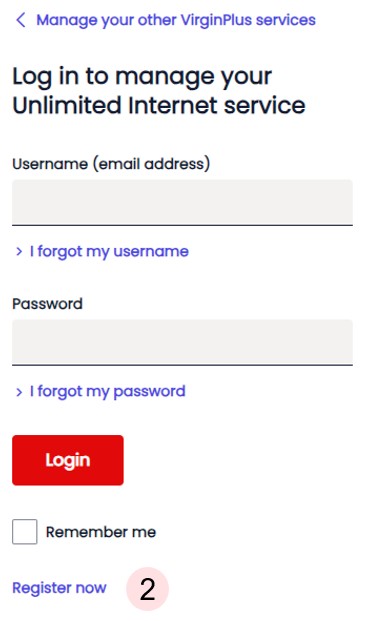
Click on the Register now option found at the bottom of the screen.
-
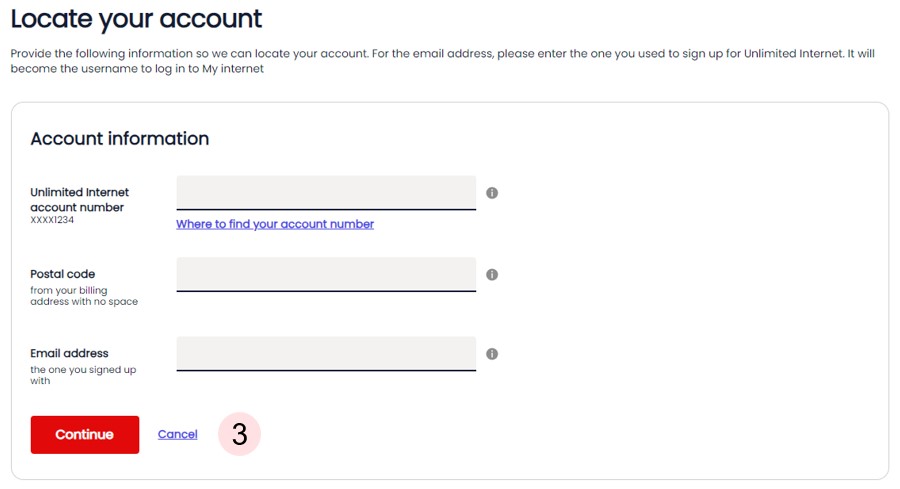
Enter your unlimited internet account number, postal code and the email address used to sign up.
-
Enter and confirm your new password. Click Continue.

-
Your registration is now complete. Click on Log In to My internet to manage your unlimited internet service.
